
Feature Three Page - Video Camera
Line Following and Barcode Scanning
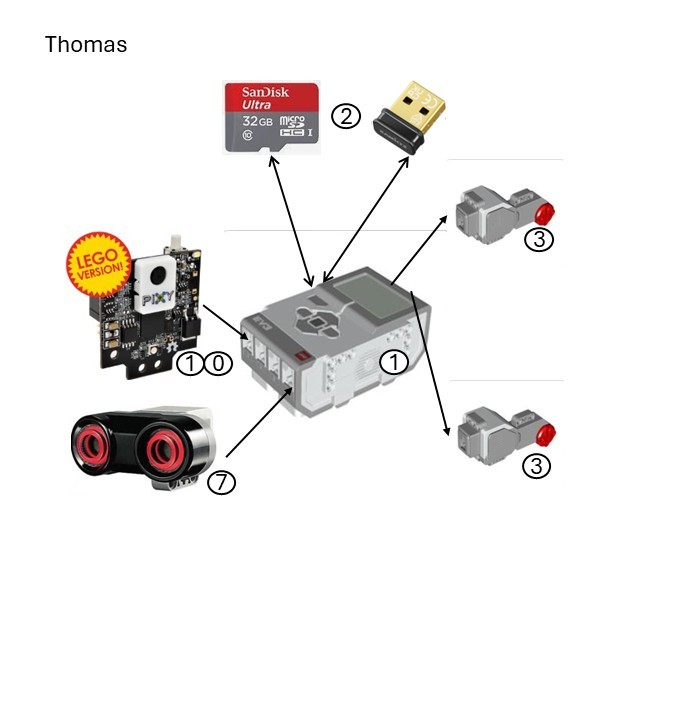
Robot
The design of Monorail is a 2-track tank type based on the LEGO
Tank Bot.
The robot is the other Jurassic Kingdom orchestrator (see
feature 4). It uses a video camera (PixyCam V2) for line following and barcode scanning, and an ultrasonic sensor for object avoidance
(see glossary for parts referenced in the hardware image).
References ...
Camera
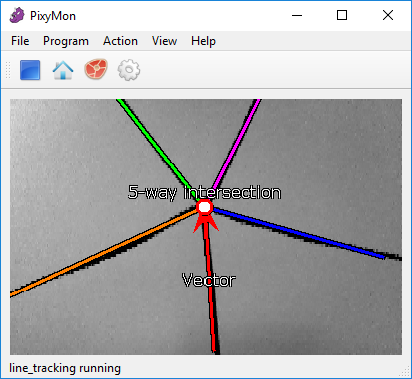
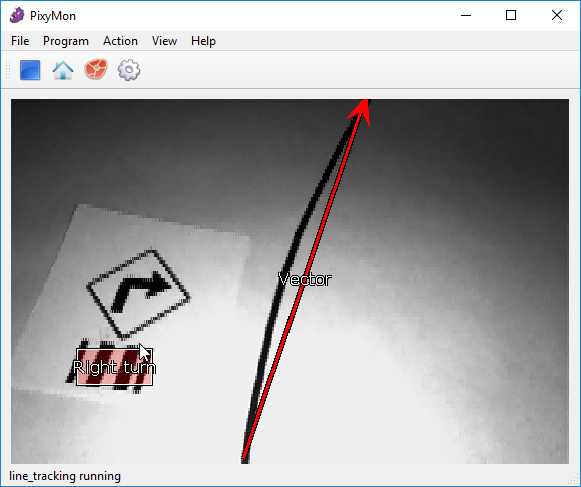
The Pixy2 camera uses line tracking/following algorithms to detect lines, intersections and small barcodes, intended for line-following robots. It communicates via the I2C (Inter-Integrated Circuit) serial protocol with the LEGO Mindstorms EV3 robot.
The camera is defined on register 0x54 and uses the pixycamev3.pixy2 Python 3 library.
It was not feasible to use Bluetooth streaming because the USB port of the robot is used by the Wi-Fi dongle.
A compatible powered USB hub and a compatible Bluetooth adapter would have been required. Due to the age of the EV3 hardware, neither could be sourced, and it was decided to continue with I2C. In any event, I2C is faster than Bluetooth and adds less overhead to the robot.
References ...
Process
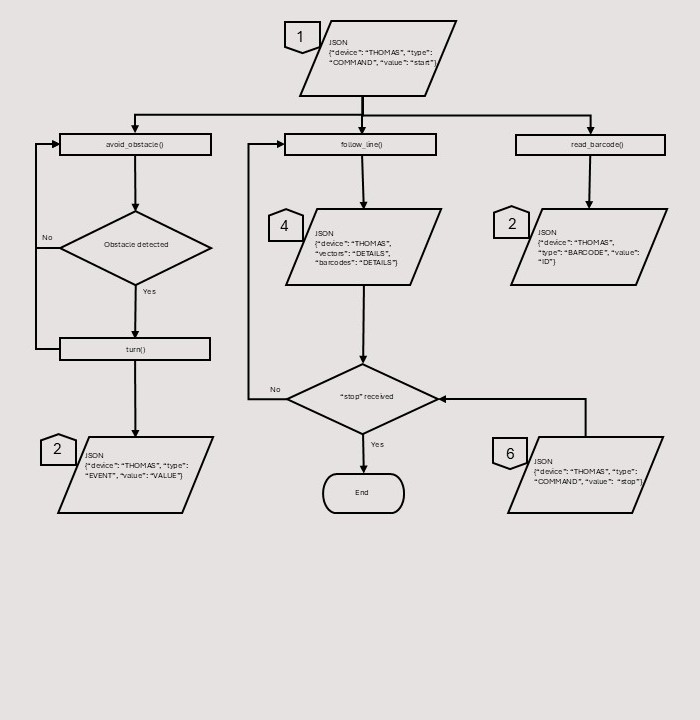
The process starts when the Flask server sends a JavaScript Object Notation (JSON) message to the main program (see input # 1) and starts several processes:
- The robot sends regular 'heartbeat' messages to the Flask server to advise it is still running. This process is common to all devices and thus not shown on this process chart
- The main process the robot performs is to follow the black middle line of the track using the Pixy2 camera. The robot sends a unique JSON message to the Flask server (see output # 4) containing vector data (see below). This process is repeated until a message to stop is received from the Flask server (see input # 6). The robot then stops moving
- The 2nd process is to read barcodes, translate their information (see below) into a unique JSON message ID and send it to the Flask server (see output # 2)
- The 3rd process is to avoid obstacles which is repeated until an obstacle is reached upon which the robot 'turns' to avoid it. This may be a simple wait (for moving obstacles) or an actual turn (for static obstacles) if the wait is too long. The robot can also send a unique JSON message to the Flask server (see output # 2).
Dashboard
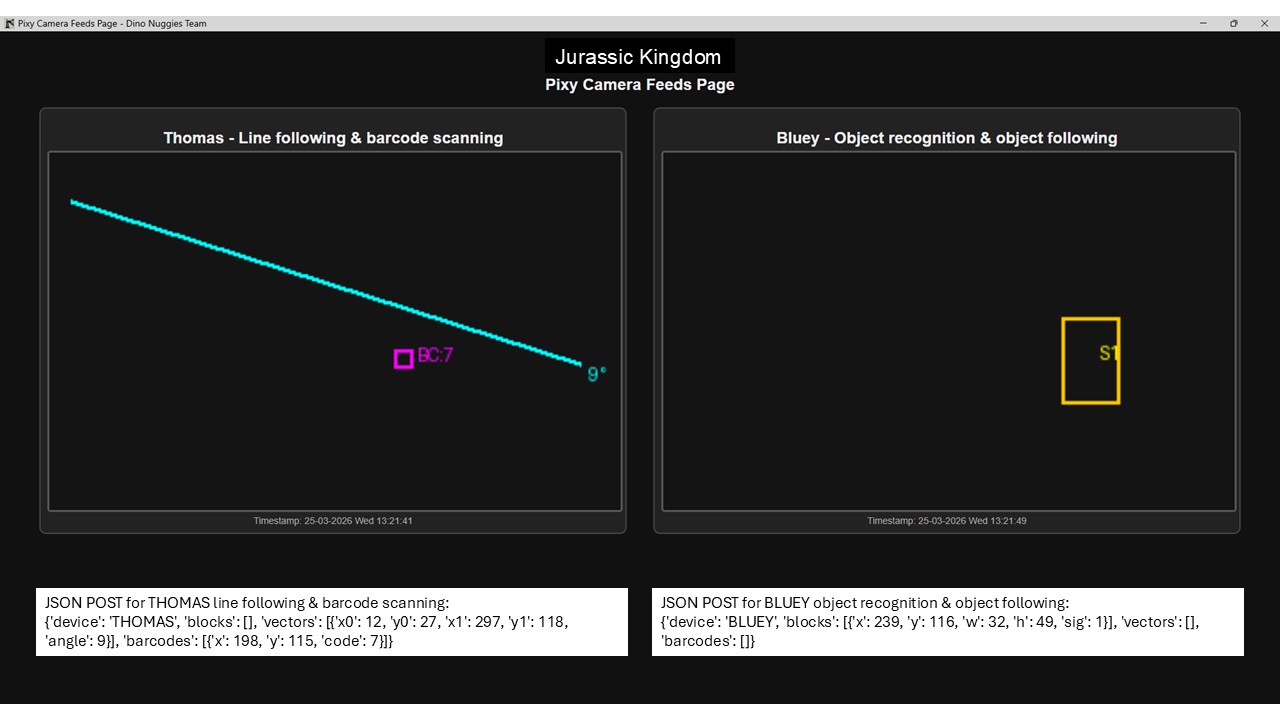
The Pixy camera transfers JSON data, not video output, which is translated into images by the Flask server. The images are updated at small time intervals which gives the impression of streaming, and presented on the 'Pixy Camera Feeds Page' in the Thomas pane.
The data consists of vectors and barcodes. Vectors have X and Y start (i.e.: x0 and y0) and end (i.e.: x1 and y1) coordinates, and an angle. Barcodes have X and Y coordinates and a value. The data is used in the JSON messages sent to the Flask server (see outputs # 2 and 4 respectively).
Object Recognition and Following
Robot
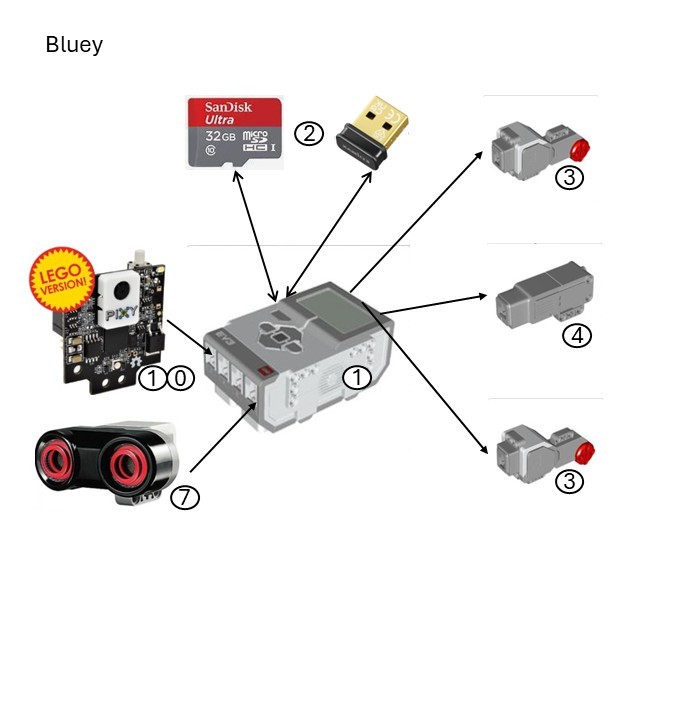
The design of the Raptor is a 4-wheeled car type based on the LEGO
EV3MEG.
The robot uses a video camera (PixyCam V2) for object recognition and following, and an ultrasonic sensor for object ‘collision’
(see glossary for parts referenced in the hardware image).
References ...
Camera
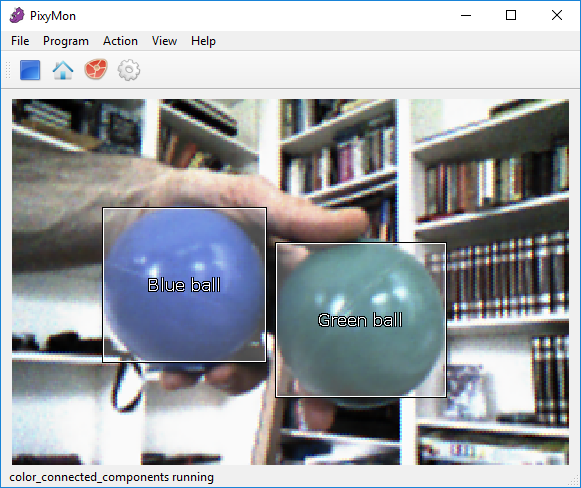
The Pixy2 camera uses tracking algorithms for colour-based object detection. It communicates via the I2C (Inter-Integrated Circuit) serial protocol with the LEGO Mindstorms EV3 robot.
The camera is defined on register 0x54 and uses the pixycamev3.pixy2 Python 3 library.
It was not feasible to use Bluetooth streaming because the USB port of the robot is used by the Wi-Fi dongle.
A compatible powered USB hub and a compatible Bluetooth adapter would have been required. Due to the age of the EV3 hardware, neither could be sourced, and it was decided to continue with I2C. In any event, I2C is faster than Bluetooth and adds less overhead to the robot.
References ...
Process
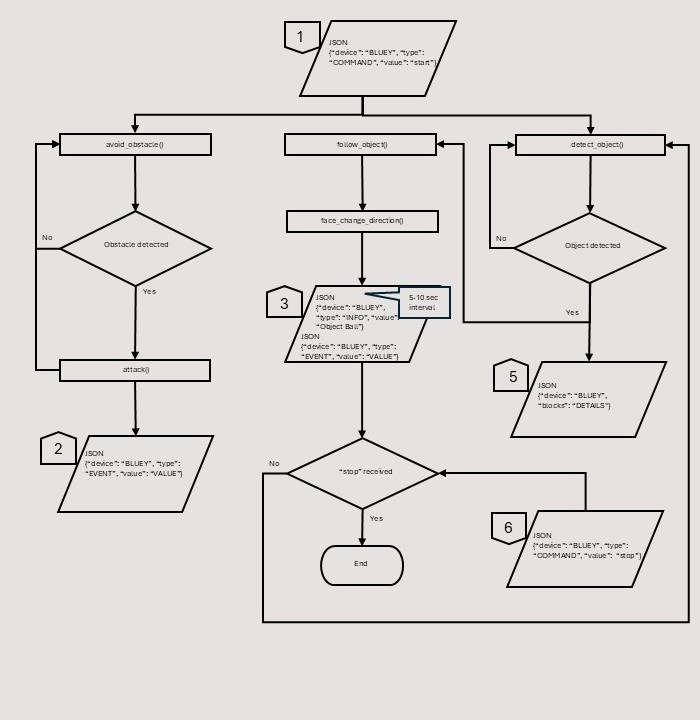
The process starts when the Flask server sends a JavaScript Object Notation (JSON) message to the main program (see input # 1) and starts several processes:
- The robot sends regular 'heartbeat' messages to the Flask server to advise it is still running. This process is common to all devices and thus not shown on this process chart
- The main process the robot performs is to detect a ball using the Pixy2 camera. The robot sends a unique JSON message to the Flask server (see output # 4) containing block data (see
below) if found.
The robot then follows the ball and faces in its direction. It also sends a unique JSON message to the Flask server (see output # 3).
This process is repeated until a message to stop is received from the Flask server (see input # 6). The robot then stops moving - The 2nd process is to attack obstacles which is repeated until an obstacle is reached upon which the robot 'claws' to attack. The robot can also send a unique JSON message to the Flask server (see output # 2).
Dashboard
The Pixy camera transfers JSON data, not video output, which is translated into images by the Flask server. The images are updated at small time intervals which gives the impression of streaming, and presented on the 'Pixy Camera Feeds Page' in the Bluey pane.
The data consists of blocks which have a X and Y coordinate, width, height, and a signature. The data is used in the JSON messages sent to the Flask server (see output # 5).
Glossary
1. Brick – EV3DEV Stretch OS (version 2020-04-10)
2. Edimax V2 Wi-Fi dongle (8188eu driver) and Sandisk 32 Gb SD card
3. Large motor (lego-ev3-l-motor class)
4. Small motor (lego-ev3-m-motor class)
5. Colour sensor (lego-ev3-color class)
6. Touch sensor (lego-ev3-touch class)
7. Ultrasonic sensor (lego-ev3-us class)
8. Mindsensors RFID reader (EV3Rfid ID‑12 / ID‑12LA chip)
9. Mindsensors IR temperature (non-contact) sensor (Melexis MLX90614 chip)
10. PixyCam V2 video camera (NXP LPC4330 chip)
11. Gyro sensor (lego-ev3-gyro class)
12. IR beacon (lego-ev3-ir class)
13. IR sensor (lego-ev3-ir class)
14. Mindsensors motor multiplexer (NXTMMX-v2 Atmel ATmega chip)