
Feature Two Page - Heat Sensor
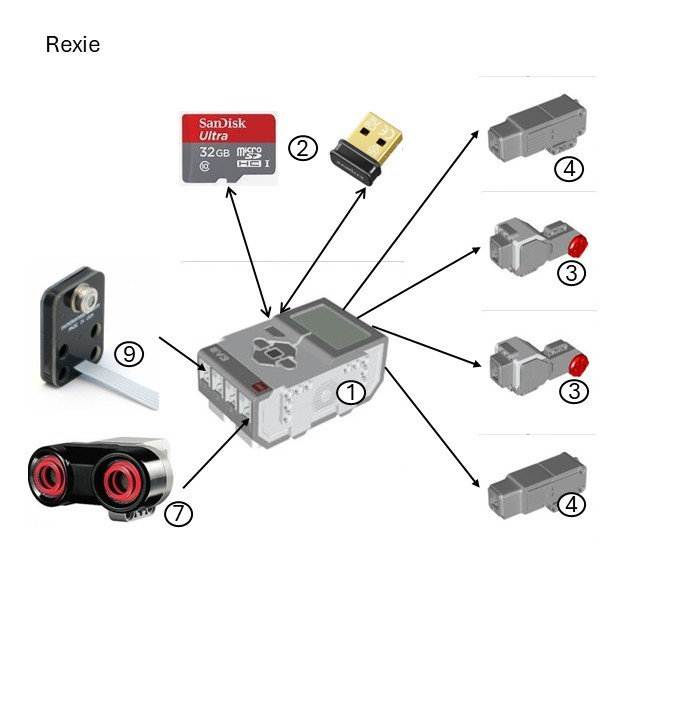
Robot
The design of the T-Rex is a 2-track tank type based on the LEGO
Znap.
It uses a heat [Infrared (IR) temperature (non-contact)]
sensor for object following, and an ultrasonic sensor for object ‘collision’
(see glossary for parts referenced in the hardware image).
References ...
Sensor
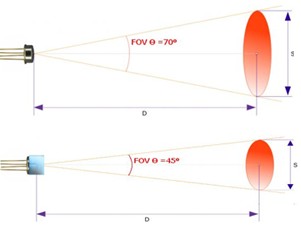
The heat sensor is a non-contact infrared thermometer. It is able to return the ambient temperature as well as the temperature of any target it is pointing towards. It can return values in both degrees Celsius and Fahrenheit.
The field of view (FoV) of the sensor is 70 degrees without the collimator cap (which is fine for close objects) and 45 degrees with it (which allows more accurate readings).
The documentation advises that registers 0x42 (LB [low byte]) and 0x43 (HB [high byte]) return the ambient temperature in degrees Celsius, and registers 0x44 (LB) and 0x45 (HB) return the target temperature in degrees Celsius.
During testing, it was found that the sensor mode can be used instead e.g.: AMBIENT-C or TARGET-C but requires the code to switch from one to the other given the robot only exposes one value per mode. The values need to be divided by 100 to obtain the actual temperature readings.
The code is written in Python 3.
References ...
Process
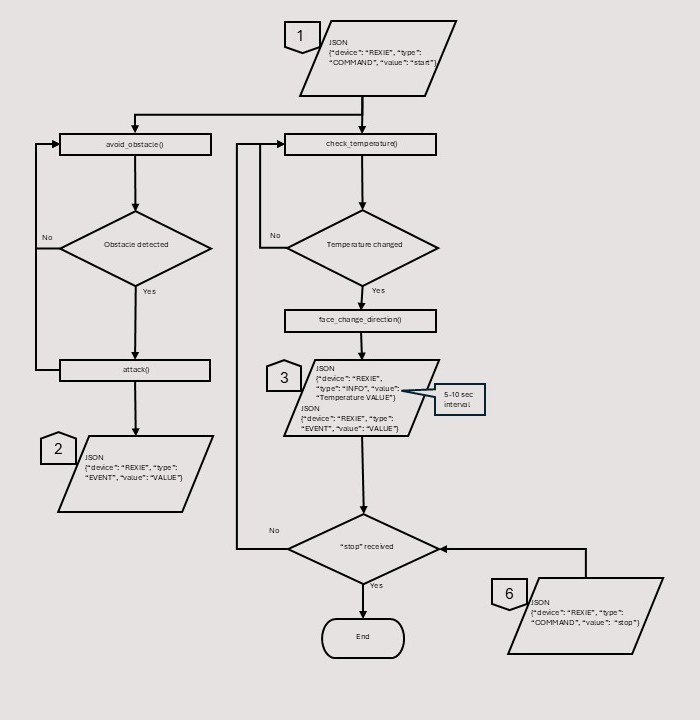
The process starts when the Flask server sends a JavaScript Object Notation (JSON) message to the main program (see input # 1) and starts several processes:
- The robot sends regular 'heartbeat' messages to the Flask server to advise it is still running. This process is common to all devices and thus not shown on this process chart
- The main process the robot performs is to check the target temperature. The target is a heat-generating device held by one of the team members to attract the robot.
This process is repeated until it finds a change of temperature which makes the robot face the heat source. The sensor is attached to a motor that makes it turn from left to right to take temperature readings.
The robot can send a unique JSON message to the Flask server (see output # 3) which contains either 'its temperature' or triggers an action. This process is repeated until a message to stop is received from the Flask server (see input # 6). The robot then stops moving - The 2nd process is to attack obstacles which is repeated until an obstacle is reached upon which the robot 'lunges' to attack. The robot can also send a unique JSON message to the Flask server (see output # 2).
Glossary
1. Brick – EV3DEV Stretch OS (version 2020-04-10)
2. Edimax V2 Wi-Fi dongle (8188eu driver) and Sandisk 32 Gb SD card
3. Large motor (lego-ev3-l-motor class)
4. Small motor (lego-ev3-m-motor class)
5. Colour sensor (lego-ev3-color class)
6. Touch sensor (lego-ev3-touch class)
7. Ultrasonic sensor (lego-ev3-us class)
8. Mindsensors RFID reader (EV3Rfid ID‑12 / ID‑12LA chip)
9. Mindsensors IR temperature (non-contact) sensor (Melexis MLX90614 chip)
10. PixyCam V2 video camera (NXP LPC4330 chip)
11. Gyro sensor (lego-ev3-gyro class)
12. IR beacon (lego-ev3-ir class)
13. IR sensor (lego-ev3-ir class)
14. Mindsensors motor multiplexer (NXTMMX-v2 Atmel ATmega chip)