
Feature One Page - RFID Reader
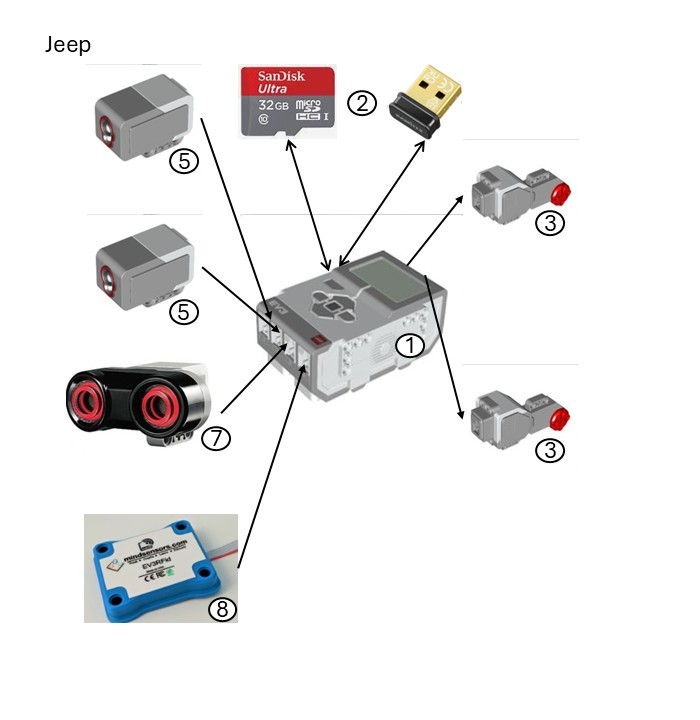
Robot
The design of the Jeep is a 4-wheeled car type based on the LEGO
driving base.
The robot is one of the Jurassic Kingdom orchestrators (see
feature 4). It uses a radio frequency identification (RFID) reader for tag scanning, and an ultrasonic sensor for object avoidance
(see glossary for parts referenced in the hardware image).
References ...
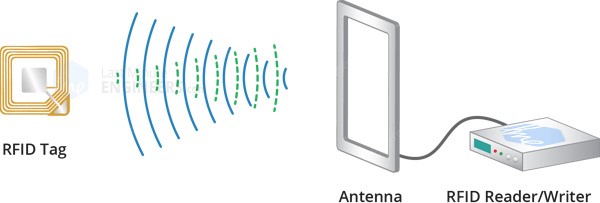
Sensor
A passive RFID system works as follows:
- The reader sends a signal to a tag using an antenna (125 kHz electromagnetic field)
- The tag e.g.: a card, fob or sticker, receives the signal and sends it back together with information stored in its memory (by taking some energy from the field)
- The reader receives the new signal and sends it to the processor (in this case a LEGO Mindstorms EV3 robot) for further handling.
The sensor is defined on register 0x22, and uses the EV3RFid class in the mindsensorsPYB Pybricks MicroPython library. It communicates via the I2C (Inter-Integrated Circuit) serial protocol with the LEGO Mindstorms EV3 robot.
References ...
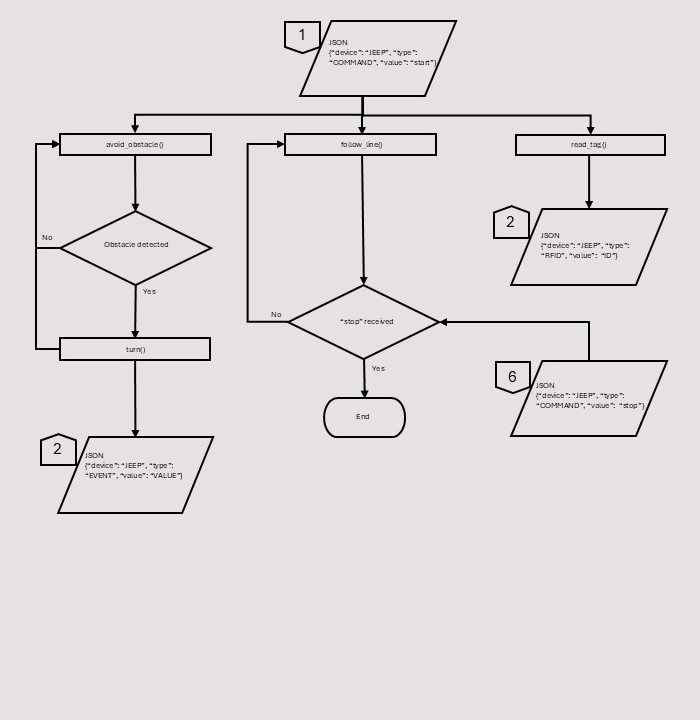
Process
The process starts when one of the team members presses the "Let's Get this Show on the Road!" button on the Flask status dashboard. This sends a JavaScript Object Notation (JSON) message to the main program (see input # 1) and starts several processes:
- The robot sends regular 'heartbeat' messages to the Flask server to advise it is still running. This process is common to all devices and thus not shown on this process chart
- The main process the robot performs is to follow the black middle line of the track using 2 colour sensors. This process is repeated until a message to stop is received from the Flask server (see input # 6). The robot then stops moving
- The 2nd process is to read RFID tags, translate their information into a unique JSON message ID and send it to the Flask server (see output # 2)
- The 3rd process is to avoid obstacles which is repeated until an obstacle is reached upon which the robot 'turns' to avoid it. This may be a simple wait (for moving obstacles) or an actual turn (for static obstacles) if the wait is too long. The robot can also send a unique JSON message to the Flask server (see output # 2).
Glossary
1. Brick – EV3DEV Stretch OS (version 2020-04-10)
2. Edimax V2 Wi-Fi dongle (8188eu driver) and Sandisk 32 Gb SD card
3. Large motor (lego-ev3-l-motor class)
4. Small motor (lego-ev3-m-motor class)
5. Colour sensor (lego-ev3-color class)
6. Touch sensor (lego-ev3-touch class)
7. Ultrasonic sensor (lego-ev3-us class)
8. Mindsensors RFID reader (EV3Rfid ID‑12 / ID‑12LA chip)
9. Mindsensors IR temperature (non-contact) sensor (Melexis MLX90614 chip)
10. PixyCam V2 video camera (NXP LPC4330 chip)
11. Gyro sensor (lego-ev3-gyro class)
12. IR beacon (lego-ev3-ir class)
13. IR sensor (lego-ev3-ir class)
14. Mindsensors motor multiplexer (NXTMMX-v2 Atmel ATmega chip)